Does Porsche Have Apple CarPlay And What You Need To Know
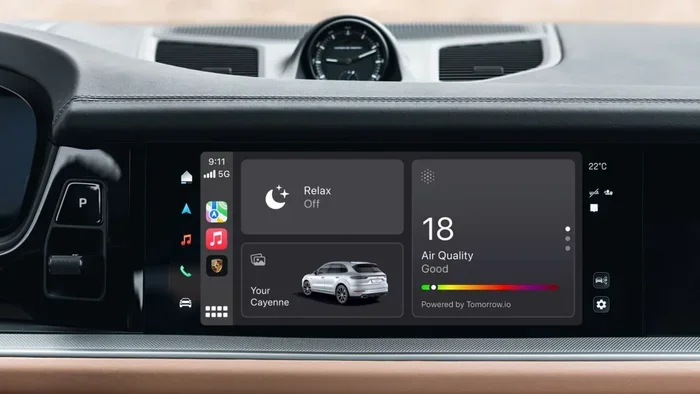
Does Porsche Have Apple CarPlay? Yes, most modern Porsche models come equipped with Apple CarPlay support through the Porsche Communication Management (PCM) system. Whether you drive a 911, Cayenne, Panamera, or Macan, Apple CarPlay integration brings seamless smartphone connectivity to your dashboard, letting you access maps, music, messages, and more safely while on the road. In this guide, we cover everything you need to know about compatibility, setup, features, and troubleshooting.
Does Porsche Have Apple CarPlay? If you are a Porsche owner or shopping for one, this is a question that comes up a lot. The short answer is yes, but the full story is a bit more nuanced. Not every Porsche model or year includes Apple CarPlay out of the box, and the way it works depends on your specific PCM system. In this article, we break down everything you need to know about Apple CarPlay in Porsche vehicles. From compatibility and setup to features and troubleshooting, we have got you covered.
Apple CarPlay has become a standard expectation for most drivers today. It lets you mirror your iPhone on your car’s display so you can use maps, make calls, send messages, and stream music without taking your eyes off the road. Porsche has embraced this technology across its lineup, but the details matter. Let us dive into what you need to know.
Key Takeaways
- Apple CarPlay is available on most Porsche models from 2018 onward, with full support on newer PCM systems.
- Wireless and wired options exist depending on your Porsche model year and PCM generation.
- Setting up Apple CarPlay is simple — just connect your iPhone via USB or through Bluetooth for wireless pairing.
- Key features include navigation, messaging, music, and Siri integration for a safer driving experience.
- Common issues like connection drops or black screens can usually be fixed with a simple restart or software update.
- Aftermarket adapters are available for older Porsche models that lack native Apple CarPlay support.
- Always check your specific model and year since not all Porsche trims include Apple CarPlay as standard.
📑 Table of Contents
- Does Porsche Have Apple CarPlay?
- Which Porsche Models Support Apple CarPlay?
- How to Set Up Apple CarPlay in Your Porsche
- Wireless vs Wired Apple CarPlay in Porsche
- Apple CarPlay Features You Will Love in Your Porsche
- Troubleshooting Apple CarPlay Issues in Porsche
- Aftermarket Apple CarPlay Options for Older Porsche Models
- Final Thoughts
Does Porsche Have Apple CarPlay?
So, does Porsche have Apple CarPlay? The answer depends on your model year and trim level. Most Porsche vehicles manufactured from 2018 onward come with Apple CarPlay support built into the Porsche Communication Management system. The PCM is Porsche’s infotainment platform, and it handles everything from navigation to audio to smartphone connectivity.
If you own a Porsche from the 2018 model year or newer, there is a very good chance your vehicle supports Apple CarPlay. However, earlier models from 2015 to 2017 may have partial support or require a software update. Some older Porsche models simply do not have the hardware needed for CarPlay integration.
What Is the Porsche Communication Management System?
The Porsche Communication Management system, or PCM, is the brain behind your car’s infotainment display. It controls the touchscreen, audio system, navigation, and smartphone connectivity. The PCM comes in different generations, and the version you have determines whether Apple CarPlay is available.
The PCM 6.0 and newer versions fully support both wired and wireless Apple CarPlay. If your Porsche has an older PCM version, you may only get wired connectivity or no support at all. You can check your PCM version in your vehicle settings or by consulting your owner’s manual.
Which Porsche Models Support Apple CarPlay?
Apple CarPlay is available across a wide range of Porsche models. Here is a breakdown of the models that support this feature:
- Porsche 911 — All 911 models from 2018 onward support Apple CarPlay. This includes the Carrera, Turbo, GT3, and GT2 RS variants.
- Porsche Cayenne — The Cayenne has supported Apple CarPlay since the 2018 model year refresh. Both the base Cayenne and the Cayenne Turbo are compatible.
- Porsche Panamera — The Panamera supports Apple CarPlay from the 2018 model year. This includes the standard Panamera and the Panamera Turbo.
- Porsche Macan — The Macan has had Apple CarPlay support since 2018. Both the Macan and Macan S are compatible.
- Porsche Taycan — The Taycan, Porsche’s electric vehicle, supports Apple CarPlay as part of its PCM 6.0 system.
If you own a Porsche model from before 2018, you may need to check with your dealer or look at aftermarket options. Some older models can be upgraded with a retrofit Apple CarPlay adapter, which we will cover later in this article.
Does Every Porsche Trim Include Apple CarPlay?
Not necessarily. In some cases, Apple CarPlay may be part of an optional package rather than standard equipment. For example, certain base trims of the Cayenne or Macan may not include Apple CarPlay as standard. It might be bundled with the Porsche Communication Management Plus package or a similar option group.
This is why it is important to check the specific features of the trim you are considering. If Apple CarPlay is a dealbreaker for you, make sure it is listed in the vehicle’s standard or optional features before you buy.
How to Set Up Apple CarPlay in Your Porsche
Setting up Apple CarPlay in your Porsche is a straightforward process. Whether you have a wired or wireless connection, the steps are simple and user-friendly.
Wired Apple CarPlay Setup
For wired Apple CarPlay, you need a Lightning-to-USB cable. Here is how to set it up:
- Plug your iPhone into the USB port in your Porsche. The port is usually located in the center console or armrest area.
- The PCM should detect your iPhone automatically and display the Apple CarPlay interface on the screen.
- If prompted, unlock your iPhone and tap “Trust” to allow the connection.
- You can now access your apps, maps, music, and messages directly from the Porsche touchscreen.
Wireless Apple CarPlay Setup
Wireless Apple CarPlay is available on Porsche models with PCM 6.0 or newer. Here is how it works:
- Make sure Bluetooth is enabled on both your iPhone and your Porsche PCM.
- Go to your Porsche settings and look for the Apple CarPlay option in the connectivity menu.
- Select your iPhone from the list of available devices.
- Your iPhone will pair wirelessly, and the Apple CarPlay interface will appear on your Porsche display automatically.
Wireless Apple CarPlay is incredibly convenient because you do not need to plug in a cable every time you get in the car. It also keeps your center console clutter-free.
Quick Tips for a Smooth Setup
- Make sure your iPhone is running the latest version of iOS.
- Restart your Porsche PCM if the connection does not appear right away.
- Use an Apple-certified Lightning cable for wired connections to avoid compatibility issues.
- Check that your Porsche software is up to date by visiting your dealer or checking through the PCM settings.
Wireless vs Wired Apple CarPlay in Porsche
One of the most common questions Porsche owners ask is whether wireless Apple CarPlay is better than wired. Both options have their pros and cons, and the right choice depends on your needs and your vehicle’s capabilities.
| Feature | Wired Apple CarPlay | Wireless Apple CarPlay |
|---|---|---|
| Connection Type | USB cable | Bluetooth and Wi-Fi |
| PCM Requirement | Any PCM with CarPlay support | PCM 6.0 or newer |
| Setup Speed | Fast, plug and play | Slightly slower initial pairing |
| Convenience | Requires carrying a cable | Automatic connection every time |
| Audio Quality | Slightly more stable | Excellent with PCM 6.0 |
| Availability | All supported Porsche models | 2018+ models with PCM 6.0 |
| Price | Included with vehicle | Included with vehicle or PCM 6.0 upgrade |
In most cases, wireless Apple CarPlay is the preferred option for Porsche owners. It offers the convenience of a cable-free connection and works seamlessly with the PCM 6.0 system. However, if you have an older Porsche model, a wired connection is still a great way to enjoy Apple CarPlay features.
Some Porsche owners report that wired connections can sometimes offer a more stable data transfer, especially when using navigation apps. But for everyday use, the wireless experience on newer Porsche models is smooth and reliable.
Apple CarPlay Features You Will Love in Your Porsche
Apple CarPlay brings a range of useful features to your Porsche dashboard. Here are some of the best features you can look forward to:
Navigation with Apple Maps and Third-Party Apps
Apple CarPlay gives you access to Apple Maps right on your Porsche display. You can get turn-by-turn directions, traffic updates, and estimated arrival times. You can also use popular navigation apps like Google Maps, Waze, and Sygic for even more routing options.
For Porsche owners who rely on navigation daily, Apple CarPlay makes it easy to find restaurants, gas stations, and destinations without fumbling with your phone.
Siri Integration for Hands-Free Control
Siri is deeply integrated with Apple CarPlay, which means you can use voice commands to make calls, send messages, play music, and get directions. Just say “Hey Siri” and ask for what you need. This keeps your hands on the wheel and your eyes on the road.
In a Porsche, this is especially valuable because it lets you take full advantage of CarPlay features without distracting you from driving.
Music and Podcasts
Apple CarPlay gives you easy access to Apple Music, Spotify, Podcasts, Audible, and other audio apps. You can control playback directly from your Porsche touchscreen or through the steering wheel controls.
If you are a podcast listener or a music enthusiast, this feature alone makes Apple CarPlay worth having in your Porsche.
Messaging and Communication
With Apple CarPlay, you can receive and respond to messages using Siri or the on-screen keyboard. The system reads incoming messages aloud and lets you dictate replies. This means you can stay connected without ever picking up your phone.
Some Porsche models also support WhatsApp and other messaging apps through Apple CarPlay, making communication even more seamless.
Phone Calls and Contacts
Apple CarPlay syncs your iPhone contacts and call history with your Porsche PCM. You can make calls, view recent calls, and access your favorites list directly from the car’s display. It is a simple but powerful feature that makes driving safer.
Troubleshooting Apple CarPlay Issues in Porsche
Even though Apple CarPlay works well in most Porsche vehicles, you may run into issues from time to time. Here are some common problems and how to fix them.
Apple CarPlay Not Connecting
If Apple CarPlay does not connect when you plug in your iPhone or pair wirelessly, try these steps:
- Restart your iPhone and your Porsche PCM.
- Check that your iPhone is running the latest iOS version.
- Make sure Bluetooth and Wi-Fi are turned on for wireless connections.
- Try a different USB cable or USB port.
- Go to your Porsche PCM settings and reset the connection.
Apple CarPlay Screen Goes Black or Freezes
A black screen or freeze can happen if the PCM and iPhone are not communicating properly. Try disconnecting and reconnecting your iPhone. If the problem persists, check for Porsche software updates. A PCM software update often fixes compatibility issues with Apple CarPlay.
Audio Cuts Out During CarPlay Use
If your audio drops out while using Apple CarPlay, make sure no other Bluetooth devices are connected to your Porsche. Sometimes the PCM switches to a different audio source automatically. You can fix this by going back to the Apple CarPlay audio source in your PCM settings.
Navigation Not Working Properly
If your navigation app is not showing directions or maps, check your internet connection. Apple CarPlay uses your iPhone’s data for map loading and traffic updates. Make sure you have a good cellular signal or that your iPhone is connected to your Porsche’s Wi-Fi hotspot if available.
When to Visit Your Porsche Dealer
If you have tried all the troubleshooting steps and Apple CarPlay still does not work, it may be time to visit your Porsche dealer. They can run diagnostics on your PCM, check for software updates, and identify any hardware issues that may be preventing Apple CarPlay from functioning properly.
Aftermarket Apple CarPlay Options for Older Porsche Models
If you own an older Porsche that does not have native Apple CarPlay support, do not worry. There are aftermarket solutions available that can bring Apple CarPlay to your vehicle.
Aftermarket Apple CarPlay adapters plug into your Porsche’s existing infotainment system and add CarPlay functionality. These adapters range from simple wired units to more advanced wireless adapters that connect through Bluetooth and Wi-Fi.
Popular aftermarket options include the AA Car Play adapter, the Carlinkit wireless adapter, and the Alpine iLX-Apple CarPlay system. These devices are designed to work seamlessly with most Porsche models and can be installed without major modifications to your vehicle.
Keep in mind that aftermarket adapters may not offer the same level of integration as factory Apple CarPlay. The display quality, responsiveness, and feature set might differ slightly. However, for older Porsche models, these adapters are a great way to get modern smartphone connectivity at a fraction of the cost of a full PCM upgrade.
Is an Aftermarket Adapter Worth It?
For many Porsche owners with older models, an aftermarket adapter is a practical and affordable solution. It lets you enjoy Apple CarPlay features without the expense of replacing your entire infotainment system. Just make sure to choose a reputable brand and check compatibility with your specific Porsche model before purchasing.
Final Thoughts
Does Porsche have Apple CarPlay? Yes, and it works impressively well across most modern Porsche models. Whether you have a 2018 Porsche 911, a Cayenne, a Panamera, a Macan, or a Taycan, Apple CarPlay integration brings your favorite iPhone features right to your dashboard. From navigation and music to messaging and Siri, the experience is smooth, intuitive, and designed to keep you connected while staying safe behind the wheel.
Setting up Apple CarPlay in your Porsche is easy, whether you prefer a wired or wireless connection. And if you run into any issues, most problems can be resolved with a simple restart or software update. For older Porsche models, aftermarket adapters offer a practical way to add Apple CarPlay support.
Apple CarPlay has become an essential feature for modern drivers, and Porsche has done an excellent job of integrating it into the PCM system. If you are considering a Porsche or already own one, make sure you are taking full advantage of this powerful connectivity feature. Your daily drives will be more convenient, more connected, and more enjoyable.
Frequently Asked Questions
Do all Porsche models come with Apple CarPlay?
Not all Porsche models come with Apple CarPlay as standard. Most Porsche vehicles from 2018 onward support Apple CarPlay, but some base trims may require an optional package. Check your specific model and trim to confirm Apple CarPlay availability.
Can I use Apple CarPlay wirelessly in my Porsche?
Yes, wireless Apple CarPlay is available in Porsche models equipped with the PCM 6.0 system or newer. This includes most Porsche vehicles from 2018 onward. Wireless CarPlay connects through Bluetooth and Wi-Fi, so you do not need a cable.
What should I do if Apple CarPlay is not working in my Porsche?
If Apple CarPlay is not working, try restarting your iPhone and your Porsche PCM. Make sure your iPhone is updated to the latest iOS version. Also, try a different USB cable or USB port. If the issue persists, check for Porsche software updates or visit your dealer for diagnostics.
Can I add Apple CarPlay to an older Porsche model?
Yes, you can add Apple CarPlay to older Porsche models using aftermarket adapters. These devices plug into your existing infotainment system and provide Apple CarPlay functionality. Popular brands include AA Car Play and Carlinkit. Make sure to check compatibility with your specific model before purchasing.
Does Apple CarPlay work with all iPhone models in a Porsche?
Apple CarPlay works with iPhone 5 and later models that are running iOS 7.1 or newer. For the best experience, make sure your iPhone is updated to the latest iOS version available. Some CarPlay features may vary depending on your iPhone model and iOS version.
Is Apple CarPlay safe to use while driving a Porsche?
Yes, Apple CarPlay is designed to be safe for use while driving. It allows you to access maps, make calls, send messages, and listen to music using voice commands through Siri. The Porsche PCM also supports steering wheel controls, so you can interact with CarPlay without taking your hands off the wheel.
=== CONCLUSION ===
Does Porsche Have Apple CarPlay? Absolutely. Most modern Porsche vehicles come with Apple CarPlay support through the PCM system, offering seamless smartphone integration for navigation, music, messaging, and more. Whether you prefer a wired or wireless connection, Apple CarPlay makes your Porsche driving experience more connected and convenient.
From the 911 to the Cayenne, Panamera, Macan, and Taycan, Apple CarPlay is widely available across the Porsche lineup. Setting it up is simple, the features are powerful, and troubleshooting common issues is usually straightforward. For older Porsche models, aftermarket adapters provide an affordable way to add this modern feature to your vehicle.
Now that you know everything about Apple CarPlay in Porsche, make sure you are getting the most out of it. Keep your software updated, use Siri for hands-free control, and enjoy the seamless connection between your iPhone and your Porsche. Safe travels and happy driving!