Does Alfa Romeo Have Apple CarPlay Here Is Everything
Yes, Alfa Romeo does offer Apple CarPlay on most of its newer models. The Giulia, Stelvio, and Tonale all support this popular smartphone integration feature. Whether you prefer a wired or wireless connection, Alfa Romeo makes it easy to stay connected and entertained on the road.
If you own an Alfa Romeo or are thinking about buying one, you might be wondering about smartphone connectivity. The short answer is yes, Alfa Romeo does have Apple CarPlay on most of its newer vehicles. But the details matter. Not every model, not every year, and not every trim level includes this handy feature. In this guide, we walk through everything you need to know about Apple CarPlay in Alfa Romeo cars. We will cover which models support it, how it works, and what you need to do to get it running.
Smartphone integration has become a must-have for most drivers today. Being able to access your phone’s features right from your car’s infotainment system makes driving safer and more convenient. Apple CarPlay is one of the most popular ways to do this. It lets you use your iPhone’s key functions like navigation, music, and messaging without taking your eyes off the road. Alfa Romeo has embraced this technology in recent years, making it available across its lineup.
Whether you drive a sporty Giulia sedan or a rugged Stelvio SUV, there is a good chance your Alfa Romeo supports Apple CarPlay. But the experience can vary depending on the model year and the specific trim you choose. Some models offer wireless Apple CarPlay, while others require a USB cable. In this article, we break down all of these details so you know exactly what to expect. Let us dive in and explore the world of Apple CarPlay in Alfa Romeo vehicles.
Key Takeaways
- Apple CarPlay is available: Most modern Alfa Romeo models come with Apple CarPlay support built in.
- Multiple models qualify: The Giulia, Stelvio, and Tonale all offer this feature in different trim levels.
- Both wired and wireless options exist: Depending on the model year and trim, you may get wireless Apple CarPlay or a USB connection.
- Setup is simple: Connecting your iPhone takes just a few steps and works automatically in most cases.
- Full feature access: You get navigation, music, messaging, and more right on your car’s screen.
- Older models may not support it: Pre-2020 Alfa Romeo vehicles might lack Apple CarPlay compatibility.
- Keep software updated: Regular updates ensure smooth performance and access to the latest Apple CarPlay features.
📑 Table of Contents
- Does Alfa Romeo Have Apple CarPlay?
- Which Alfa Romeo Models Support Apple CarPlay?
- How Apple CarPlay Works in Alfa Romeo Vehicles
- Apple CarPlay Features You Can Use in Alfa Romeo
- Wireless vs Wired Apple CarPlay in Alfa Romeo
- Common Issues and How to Fix Them
- Quick Tips for Getting the Most Out of Apple CarPlay in Your Alfa Romeo
- Expert Insights on Apple CarPlay and Alfa Romeo
- Is Apple CarPlay Worth It in an Alfa Romeo?
- Final Thoughts
Does Alfa Romeo Have Apple CarPlay?
The answer is a clear yes for most current Alfa Romeo models. Alfa Romeo has made Apple CarPlay a standard or available feature across its lineup in recent years. This means you can connect your iPhone to your car’s infotainment system and access all the features you love. From making calls to streaming music, Apple CarPlay brings your phone’s capabilities right to your dashboard.
However, it is important to note that not all Alfa Romeo vehicles have this feature. Older models from before 2020 may not support Apple CarPlay at all. And even among newer models, the availability can depend on the trim level and the specific infotainment system installed. Always check the details for your exact model and year before making a purchase decision.
What Is Apple CarPlay and Why Does It Matter?
Apple CarPlay is a technology that mirrors key functions of your iPhone onto your car’s display. Once connected, you can use apps like Maps for navigation, Spotify or Apple Music for music streaming, and Messages for hands-free texting. The system is designed to be safe and easy to use while driving. It uses a simple interface that is familiar to anyone who has used an iPhone.
For Alfa Romeo owners, Apple CarPlay adds a layer of convenience that makes the driving experience much more enjoyable. Instead of fiddling with your phone, you can control everything through your car’s touchscreen or voice commands. This is especially useful for long road trips or daily commutes where staying connected matters. The feature also supports Siri voice commands, so you can keep your hands on the wheel and your eyes on the road.
Which Alfa Romeo Models Support Apple CarPlay?
Alfa Romeo offers Apple CarPlay on several of its current models. Here is a breakdown of which vehicles include this feature and what you need to know about each one.
Alfa Romeo Giulia
The Giulia is Alfa Romeo’s sporty sedan, and it comes with Apple CarPlay support on most trim levels. The base Giulia model may require the optional tech package to include Apple CarPlay, while higher trims often have it as standard. The infotainment system on the Giulia is responsive and easy to navigate. You can connect your iPhone using either a USB cable or, on newer models, through a wireless connection.
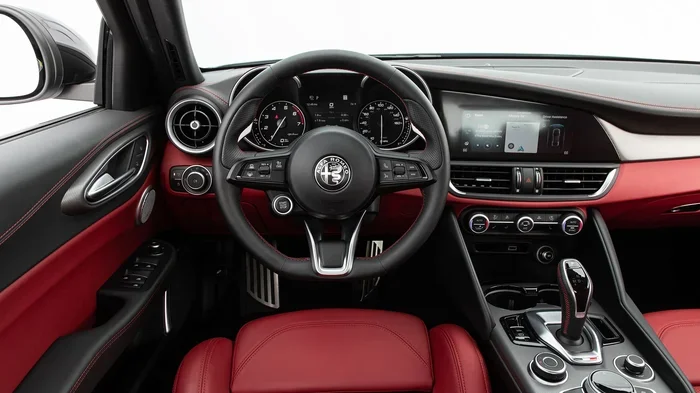
The Giulia’s interior is designed with driver comfort in mind, and adding Apple CarPlay to the mix makes it even more functional. Whether you are commuting to work or heading out on a weekend getaway, having your phone’s features at your fingertips makes the drive smoother. The Giulia also supports Android Auto for those who prefer an alternative smartphone integration option.
Alfa Romeo Stelvio
The Stelvio is Alfa Romeo’s compact luxury SUV, and it also supports Apple CarPlay. Like the Giulia, the Stelvio offers this feature across most trim levels, though some base models may require an upgrade to the infotainment package. The Stelvio’s larger screen makes using Apple CarPlay a pleasant experience. The interface is clear and easy to read, even while driving.
For families or anyone who needs extra cargo space, the Stelvio is a great choice that does not skimp on technology. Apple CarPlay integration means you can use your favorite navigation apps, stream your playlists, and stay connected with hands-free calling. The SUV’s spacious cabin pairs well with the smart features of Apple CarPlay, making every trip more enjoyable.
Alfa Romeo Tonale
The Tonale is Alfa Romeo’s newest compact SUV, and it comes with Apple CarPlay as a standard feature. This is one of the most modern Alfa Romeo models on the market, and its infotainment system is fully loaded with connectivity options. The Tonale offers wireless Apple CarPlay on higher trims, which means no cables are needed at all. You simply pair your iPhone and everything syncs automatically.
The Tonale also features a digital instrument cluster and a central touchscreen that work seamlessly with Apple CarPlay. The system is fast, intuitive, and very user-friendly. If you are looking for the latest in Alfa Romeo technology, the Tonale is the model to watch. It represents the brand’s commitment to modern car connectivity and smart driving features.
How Apple CarPlay Works in Alfa Romeo Vehicles
Setting up Apple CarPlay in your Alfa Romeo is straightforward. The process is similar across all models, though the exact steps may vary slightly depending on the year and trim. Here is how it generally works.
Wired Connection
For models that do not offer wireless Apple CarPlay, a USB cable is all you need. Simply plug your iPhone into the car’s USB port using a Lightning cable. Your car’s infotainment system should recognize the device and display the Apple CarPlay interface. From there, you can access all your favorite apps and features.
A wired connection is reliable and does not depend on Bluetooth pairing. It also charges your phone while you drive, which is a nice bonus. The downside is that a cable can be slightly restrictive, especially if you like to mount your phone on the dashboard or console.
Wireless Connection
On Alfa Romeo models that support wireless Apple CarPlay, the process is even simpler. You pair your iPhone with the car’s system through Bluetooth, and Apple CarPlay connects automatically every time you get in the car. No cables, no fuss. Just get in, start the engine, and your phone is ready to go.
Wireless Apple CarPlay uses Bluetooth for the initial connection and Wi-Fi for data transfer. This means you get faster app loading times and smoother performance compared to a wired connection. The Tonale and some newer Giulia and Stelvio trims offer this wireless capability, making it one of the best car connectivity options available today.
Setting Up Apple CarPlay for the First Time
When you first connect your iPhone to an Alfa Romeo with Apple CarPlay, you may need to grant permissions. Your car will ask if you want to allow access to certain features like Maps, Music, and Messages. You can choose which apps to enable. Once set up, the system remembers your preferences, so you do not have to configure it every time.
Here are some quick tips for a smooth setup:
- Make sure your iPhone is updated to the latest iOS version.
- Use an Apple-certified USB cable if you are going the wired route.
- Restart your iPhone if the connection does not work right away.
- Check that Bluetooth is enabled on your phone for wireless connections.
- Delete and re-pair your device if you experience any connectivity issues.
Apple CarPlay Features You Can Use in Alfa Romeo
Once Apple CarPlay is connected in your Alfa Romeo, you unlock a wide range of features. These are designed to keep you connected, entertained, and informed while staying safe on the road.
Navigation Apps
One of the most popular Apple CarPlay features is access to navigation apps. Apple Maps comes built in, but you can also use Google Maps, Waze, and other navigation apps. These apps provide turn-by-turn directions, real-time traffic updates, and estimated arrival times. For drivers who rely on GPS navigation, this is a game-changer.
The large Alfa Romeo infotainment screen makes these navigation apps easy to read and interact with. You can zoom in and out, switch between views, and get voice-guided directions all without touching your phone. This level of car connectivity makes longer trips less stressful and more enjoyable.
Music and Media Streaming
Apple CarPlay gives you access to all your favorite music apps right from your car’s dashboard. Apple Music, Spotify, Pandora, Amazon Music, and many other streaming services work seamlessly with CarPlay. You can browse playlists, search for songs, and control playback using the car’s touchscreen or voice commands through Siri.
For audiophiles who care about sound quality, Apple CarPlay supports high-resolution audio streaming on compatible apps. Combined with the Alfa Romeo’s premium audio system, you can enjoy your music the way it was meant to be heard. Whether you are into rock, jazz, podcasts, or audiobooks, Apple CarPlay has you covered.
Hands-Free Calling and Messaging
Safety is a top priority when driving, and Apple CarPlay helps you stay connected without distractions. You can make and receive phone calls through your car’s speakers and microphone. Siri voice commands let you send and read text messages without ever picking up your phone.
Simply say “Hey Siri” and tell it what you need. You can ask Siri to call a contact, send a text, or read your latest messages aloud. This hands-free approach keeps your eyes on the road and your hands on the wheel. It is one of the best reasons to use Apple CarPlay in any car, and Alfa Romeo makes the experience smooth and intuitive.
Third-Party Apps
Beyond the built-in Apple apps, Apple CarPlay supports a wide range of third-party apps. You can use WhatsApp for messaging, Uber or Lyft for ride-sharing, and various podcast apps for on-the-go listening. The selection of CarPlay compatible apps grows every year, so you always have new options to explore.
Alfa Romeo’s infotainment system handles these apps well, with smooth transitions and fast loading times. The touchscreen is responsive, and the interface is clean and easy to navigate. This makes the Alfa Romeo technology experience on par with some of the best in the luxury car segment.
Wireless vs Wired Apple CarPlay in Alfa Romeo
When it comes to connecting your iPhone to your Alfa Romeo, you have two main options: wireless Apple CarPlay and wired Apple CarPlay. Each has its own advantages, and the best choice depends on your preferences and your specific model.
Wireless Apple CarPlay
Wireless Apple CarPlay uses Bluetooth and Wi-Fi to connect your iPhone to the car. There are no cables to deal with, and the connection is automatic. Once you pair your phone, Apple CarPlay launches every time you get in the car. This is the most convenient option and is available on select Alfa Romeo models and trims.
The main advantage of wireless CarPlay is convenience. You do not have to fumble with cables or worry about the connection port being loose. The setup is clean, and the experience feels seamless. If you are considering an Alfa Romeo model with wireless Apple CarPlay, it is definitely worth the upgrade.
Wired Apple CarPlay
Wired Apple CarPlay uses a USB cable to connect your iPhone to the car’s infotainment system. This is the older method but still very reliable. The connection is stable, and you do not have to worry about Wi-Fi signal strength or Bluetooth interference. It also charges your phone while you drive, which is a practical benefit.
The downside of a wired connection is the cable itself. It can be awkward to route, and it limits where you can place your phone. Some drivers also report that wired Apple CarPlay can be slightly slower to load compared to the wireless version. However, for many people, a wired connection works perfectly fine and gets the job done.
| Feature | Wireless Apple CarPlay | Wired Apple CarPlay |
|---|---|---|
| Connection Type | Bluetooth and Wi-Fi | USB Cable |
| Setup | Automatic after pairing | Plug in and go |
| Convenience | Very high, no cables | Moderate, cable needed |
| Charging | No charging | Yes, charges phone |
| Speed | Fast app loading | Slightly slower |
| Availability in Alfa Romeo | Higher trims and Tonale | Most models with CarPlay |
Common Issues and How to Fix Them
While Apple CarPlay works well in Alfa Romeo vehicles most of the time, you may occasionally run into issues. Here are some common problems and how to solve them.
Apple CarPlay Not Connecting
If Apple CarPlay does not connect when you plug in your iPhone or pair wirelessly, try these steps. First, make sure your iPhone’s software is up to date. Go to Settings, then General, then Software Update. Next, restart your iPhone and try connecting again. If you are using a wired connection, try a different USB cable or a different USB port in the car.
For wireless connections, go to your iPhone’s Bluetooth settings and forget the car, then re-pair. Sometimes simply resetting the car’s infotainment system by holding the power button for 10 seconds can resolve connection issues. If the problem persists, check with your Alfa Romeo dealer for software updates for the infotainment system.
Apple CarPlay Keeps Disconnecting
A disconnecting Apple CarPlay connection can be frustrating. This issue often happens when the iPhone goes to sleep or when the Bluetooth connection drops. Make sure your phone is not in low power mode, as this can interfere with CarPlay. Also, check that nothing is blocking the Bluetooth signal between your phone and the car.
If you are using a wired connection, a loose or damaged cable is a common culprit. Inspect your cable for wear and tear and replace it if needed. Keeping your iPhone and your car’s infotainment system updated to the latest software versions also helps prevent disconnection problems.
Touchscreen Not Responding to CarPlay
Sometimes the Alfa Romeo infotainment screen may not respond to touch inputs while Apple CarPlay is active. This can happen if the screen is dirty or if there is a software glitch. Clean the screen with a soft, microfiber cloth and try again. If the issue persists, restart the infotainment system or reboot your iPhone.
In rare cases, a factory reset of the infotainment system may be needed. This should be done by a qualified Alfa Romeo technician to avoid any issues. Regular software updates from Alfa Romeo also help keep the system running smoothly and prevent touchscreen problems.
Quick Tips for Getting the Most Out of Apple CarPlay in Your Alfa Romeo
To get the best experience with Apple CarPlay in your Alfa Romeo, keep these tips in mind:
- Use an Apple-certified cable: Cheap cables can cause connection problems and may not charge your phone properly.
- Keep your iPhone charged: Even with wireless CarPlay, your phone battery drains faster when connected. Start with a charged phone.
- Organize your CarPlay apps: Rearrange your apps in CarPlay settings so the ones you use most are front and center.
- Use Siri for safety: Instead of tapping the screen while driving, use voice commands to control Apple CarPlay.
- Update regularly: Keep both your iPhone and your car’s infotainment system updated for the best performance.
- Explore settings: Go into CarPlay settings on your iPhone to customize which apps appear and how they behave.
Expert Insights on Apple CarPlay and Alfa Romeo
From an automotive technology perspective, Alfa Romeo has done a solid job integrating Apple CarPlay into its vehicles. The brand has embraced modern car connectivity and made it accessible to a wide range of buyers. The infotainment systems in recent Alfa Romeo models are responsive, feature-rich, and user-friendly.
One thing that sets Alfa Romeo apart is the quality of its interior design. The infotainment screen is well-positioned and easy to see while driving. The controls are intuitive, and the overall system feels premium. When you add Apple CarPlay to the mix, the experience becomes even more polished. It is clear that Alfa Romeo has put thought into how drivers and passengers interact with their technology on the road.
For those who are new to Apple CarPlay, the learning curve is minimal. The interface is very similar to what you see on your iPhone, so you will feel right at home. Whether you are using Maps for directions, Music for your playlist, or Messages for hands-free communication, everything works exactly as you would expect. This familiarity is one of the biggest strengths of Apple CarPlay as a car connectivity solution.
Is Apple CarPlay Worth It in an Alfa Romeo?
Absolutely. Apple CarPlay adds significant value to any Alfa Romeo. It enhances safety by allowing hands-free calling, messaging, and navigation. It improves convenience by giving you access to your favorite apps without digging through your phone. And it boosts entertainment by letting you stream music and podcasts through your car’s audio system.
If you are comparing Alfa Romeo models, prioritize those that offer Apple CarPlay, especially wireless Apple CarPlay. The difference in daily usability is noticeable. A car that integrates seamlessly with your smartphone just feels more modern and more complete. Alfa Romeo delivers on this front across its current lineup, making it a strong choice for anyone who values smart car technology.
Final Thoughts
So, does Alfa Romeo have Apple CarPlay? The answer is a resounding yes. From the Giulia to the Stelvio to the Tonale, Alfa Romeo offers Apple CarPlay across its current model range. Whether you prefer a wired or wireless connection, there is an Alfa Romeo that fits your needs. The feature works reliably, looks great on the car’s infotainment screen, and gives you access to all the iPhone features you rely on every day.
Before buying or upgrading, always confirm the specific Apple CarPlay availability for your exact model, year, and trim. A quick check with an Alfa Romeo dealer or a look at the vehicle specifications online will save you any surprises. With Apple CarPlay, your Alfa Romeo becomes more than just a beautiful car. It becomes a smart, connected driving companion that keeps you informed, entertained, and safe on every journey.
Embrace the technology, set up your Apple CarPlay today, and enjoy the best of both worlds: the passion of Alfa Romeo and the convenience of your iPhone. The road ahead has never looked brighter or more connected.
Frequently Asked Questions
Do all Alfa Romeo models have Apple CarPlay?
Most current Alfa Romeo models support Apple CarPlay, including the Giulia, Stelvio, and Tonale. However, older models from before 2020 may not have this feature. Always check the specific model and trim level to confirm availability.
Can I use Apple CarPlay wirelessly in an Alfa Romeo?
Yes, wireless Apple CarPlay is available on select Alfa Romeo models and trims. The Tonale offers wireless CarPlay on higher trims, and some newer Giulia and Stelvio models also support it. Check your specific vehicle to confirm.
How do I set up Apple CarPlay in my Alfa Romeo?
For a wired connection, simply plug your iPhone into the USB port using a Lightning cable. For wireless, go to your iPhone Bluetooth settings, find your Alfa Romeo, and pair the devices. Apple CarPlay will connect automatically each time you get in the car.
Is Apple CarPlay free to use in Alfa Romeo?
Yes, Apple CarPlay is free to use. There are no subscription fees or extra charges. You just need an iPhone that supports CarPlay and an Alfa Romeo model that has the feature available.
Can I use Apple CarPlay and Android Auto at the same time in my Alfa Romeo?
No, you can only use one smartphone integration system at a time. However, most Alfa Romeo models that support Apple CarPlay also support Android Auto, so you can switch between them as needed.
What should I do if Apple CarPlay stops working in my Alfa Romeo?
Try restarting your iPhone and the car’s infotainment system. Check that your software is up to date on both devices. If the issue persists, try a different USB cable or re-pair the Bluetooth connection. Contact your Alfa Romeo dealer for further assistance if needed.
=== CONCLUSION ===
Alfa Romeo has embraced Apple CarPlay across its current lineup, making it easy for drivers to stay connected, entertained, and safe on the road. From the sporty Giulia and the rugged Stelvio to the modern Tonale, there is an Alfa Romeo for everyone that supports this essential smartphone integration feature. Whether you prefer the simplicity of a wired connection or the convenience of wireless Apple CarPlay, the experience is smooth and reliable.
The key is to confirm the specific details for your model, year, and trim before making a purchase. With the right Alfa Romeo and a working Apple CarPlay setup, you get the best of both worlds: the driving passion of an Italian sports car and the smart connectivity of your iPhone. Set up your Apple CarPlay today and enjoy every mile.